



AI study app for students · fromFrom lecture to exam prep
Turn your lectures into
personalized exam preparation.
Record class live or import your slides, PDFs and notes. TurboStudy turns them into lecture transcripts, study notes, flashcards, practice quizzes and active recall, then shows how exam-ready you are and what to study next.
- Free plan
- No credit card
- Cancel anytime
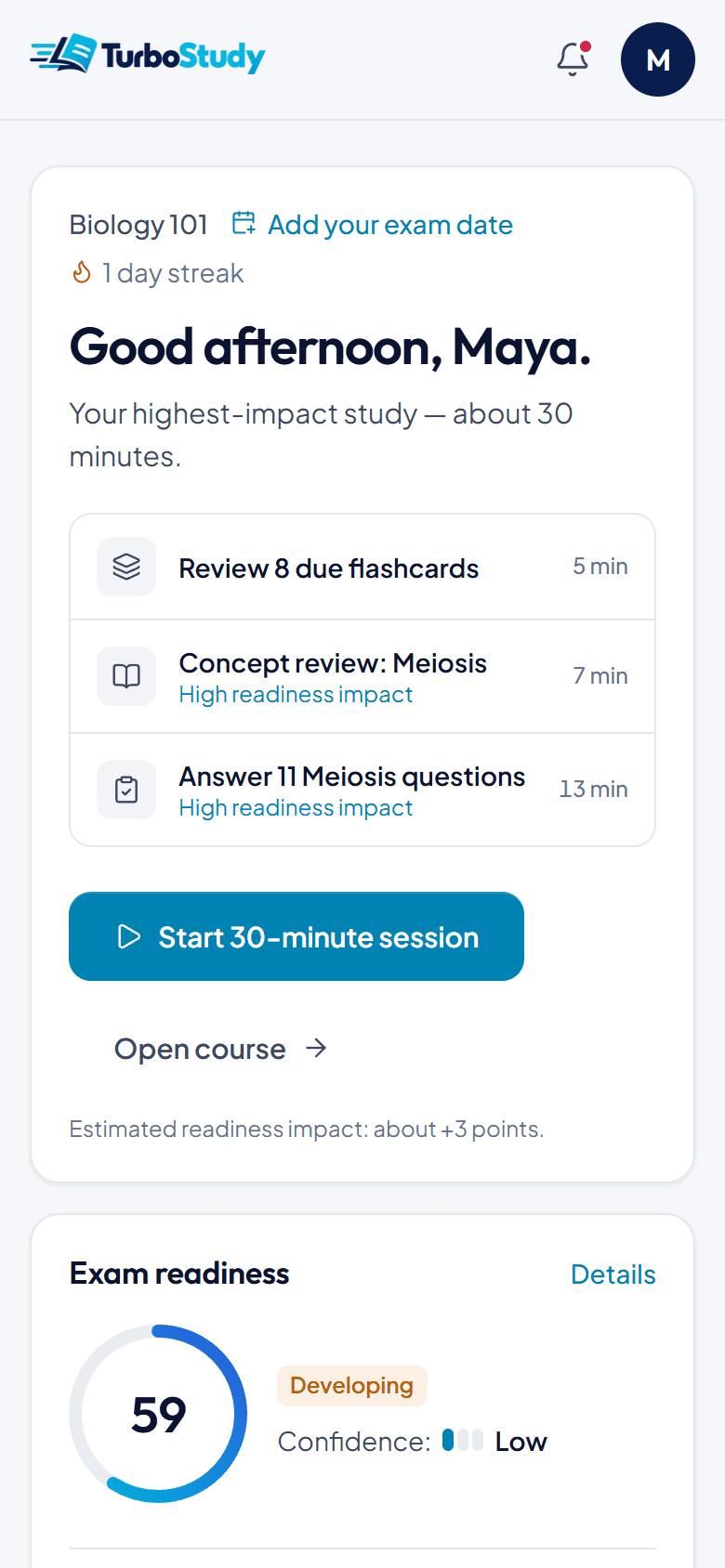
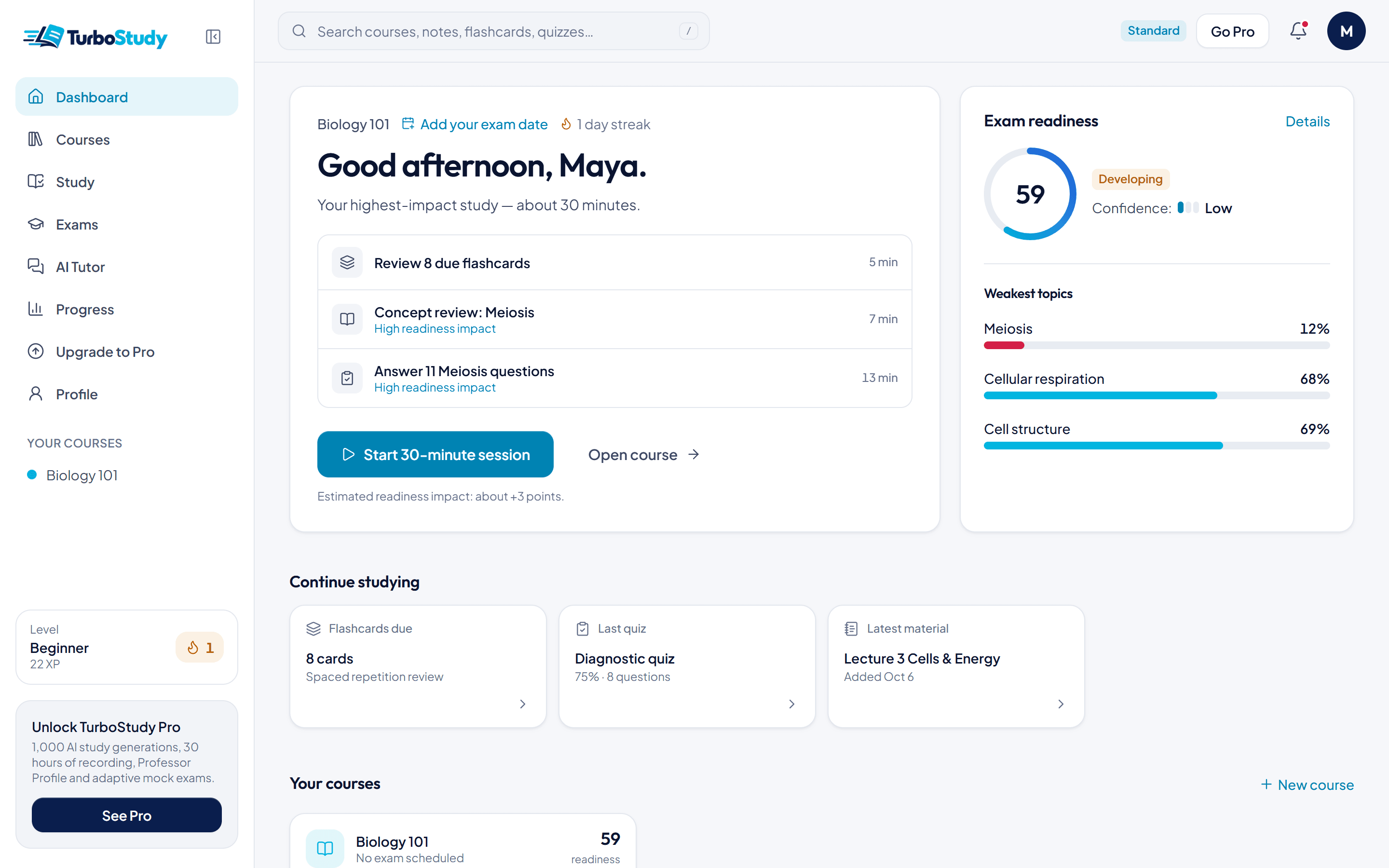
Shown with a sample biology course.
From lecture to exam day, in one place.
Real TurboStudy screens, shown with a sample biology course.
01Upload
Your lecture ends. Your study set begins.
- You
- Drop in slides, PDFs, Word docs or typed notes — several files at once.
- TurboStudy
- Sorts them into topics and writes notes with page references, plus a first set of flashcards. Usually in about a minute.
- Why it helps
- You study from your own course, not a generic summary.
02RecordStandard & Pro
Record class. Keep every word.
- You
- Press record when your professor starts talking.
- TurboStudy
- Transcribes the lecture live, then turns it into notes and flashcards inside the course.
- Why it helps
- Nothing said in class gets lost before the exam.
03Remember
Stop rereading. Start remembering.
- You
- Flip through cards built from your lecture and rate how well you knew each one.
- TurboStudy
- Spaced repetition schedules every card for just before you'd forget it.
- Why it helps
- Recalling an answer sticks far better than reading it again.
04Practice
Practice like it's the exam.
- You
- Take multiple-choice quizzes and practice exams built from your own lectures and readings.
- TurboStudy
- Grades every answer and explains it, citing the page it came from.
- Why it helps
- You find the gaps while there's still time to fix them.
05Measure
Know what you know — and what you don't.
- You
- Keep studying the way you already do.
- TurboStudy
- Every answer feeds an Exam Readiness score for each course, with a confidence level and your weakest topics first.
- Why it helps
- You always know what to study next.
Don't just generate notes. Find out if you're ready.
Other study tools create material. TurboStudy tells you what to study next.
Every graded quiz and practice answer becomes evidence (flashcard reviews add your own self-ratings). TurboStudy turns it into an Exam Readiness Score from 0 to 100 for each course, tells you how reliable that score is, and points you to the topics that need work. Topics you haven't practiced count against you, so the score stays honest.
Every score comes with a confidence level
Confidence shows how much evidence is behind the number. It grows as you answer more questions, cover more topics and use more than one way of studying.
Microeconomics 201
Midterm in 9 days
Readiness 52 · Confidence: Low
You've only practiced 35% of exam topics.
Not practiced yet: Elasticity · Market structures · Game theory
What it means: it's an early estimate from a small part of the course. Practice the remaining topics and the score — and its confidence — will tell you much more.
Readiness is an estimate based on your TurboStudy activity and uploaded material. It does not predict your actual grade.
Free: preview · Standard: full score & weak topics
Everything else you need before an exam.
One place for every course, built around your own material.
A tutor that knows your course
Ask anything about your material. Answers come from your uploads, with links back to the page.
Active recallStandard
Explain a concept in your own words. TurboStudy grades it, fills the gaps and adjusts the difficulty.
Plans to exam dayStandard
Add an exam date and get a day-by-day plan that updates as you study.
Mistake bank
Every question you miss is saved and grouped by concept, ready to retry.
Adaptive mock examsPro
Full mock exams weighted toward the topics you're weakest on, so your practice goes where it counts.
Export anywhereStandard
Download your notes, flashcards (CSV, Anki, Quizlet), quizzes, transcripts or a whole course as a ZIP — on every plan.
Record or upload your class. Get everything you need to study it.
Add lecture slides, PDFs and readings, typed notes, or lecture recordings. TurboStudy turns them into multiple-choice quizzes, flashcards, notes, practice exams and active recall — and an Exam Readiness Score that shows what to study next.
AI lecture recorder
Record class with live transcription, or upload audio, and get timestamped notes from it.
Learn moreAI lecture notes
Organized notes by topic from slides, PDFs and readings, with page and slide references.
Learn moreAI flashcards
One idea per card, linked to the source, reviewed with spaced repetition.
Learn moreAI quiz generator
Multiple-choice quizzes from your own material, with an explanation for every answer.
Learn morePractice exams
Timed, mixed-topic practice exams built from your whole course.
Learn moreActive recall
Answer open questions from memory and get feedback on what you missed.
Learn moreExam readiness checker
A 0–100 estimate of how prepared you are, with your weakest topics first.
Learn moreAI study planner
Add an exam date and get a day-by-day plan that updates as you study, plus exam reminders.
Learn more
New to active recall or practice exams? Read the study guides
Start free. Upgrade when exams get serious.
Free covers your first class. Standard adds lecture recording, practice exams and the full Exam Readiness score; Pro adds higher limits and deep exam analysis.
You're charged in CAD.
Free
Start studying.
Forever. No credit card required.
- AI notes & summaries
- AI flashcards & spaced repetition
- Quizzes with instant feedback
- AI tutor
- Exam Readiness preview
- 50 study credits a month
- 3 file imports a month (up to 10 MB · 30 pages each; originals stay on your device)
- 1 course · quizzes up to 10 questions
- 100 MB of cloud storage for everything you save
- Saved materials are free to review anytime
Standard
Study smarter.
Billed monthly. Cancel anytime.
- 8,500 AI generations a month
- 75 hours of lecture recording & transcription
- Exam Readiness
- Weakness Detection
- Active Recall
- Practice Exams
- Personalized Study Plans
- 8,500 AI requests a month (each generation counts once, whatever its size)
- 75 hours of lecture recording/transcription a month (4,500 minutes)
- 500 file imports a month (up to 20 MB · 75 pages each; originals stay on your device)
- Flashcards, quizzes, summaries, notes and study guides
- 5 courses · quizzes up to 50 questions
- 500 MB of cloud storage for everything you save
Pro
Master your exams.
Billed monthly. Cancel anytime.
or try premium free for 5 days · no card
- Everything in Standard
- Unlimited AI generation
- Unlimited monthly lecture recording & transcription
- Unlimited file imports (within 2 GB of cloud storage)
- Advanced exam preparation (Exam Intelligence)
- Adaptive Mock Exams
- False Mastery Detection
- Detailed progress analytics
- Unlimited AI generation: notes, summaries, flashcards, quizzes, mock exams and study guides
- Unlimited monthly lecture recording & transcription (up to 3 hours per recording)
- Unlimited file imports (up to 30 MB · 150 pages each; originals stay on your device)
- Any number of courses · quizzes up to 100 questions
- 2 GB of cloud storage for everything you save (generating is unlimited; saved items use space)
Prices in CAD, billed monthly (amounts in the other currency are estimates). Subscriptions renew automatically until cancelled — cancel anytime from Settings → Billing and keep access until the end of the period you paid for. Monthly allowances reset at the start of each billing period. AI generation covers quizzes, practice exams, flashcards, notes, summaries, study guides and tutor answers: on Free it uses study credits (bigger jobs use more), on Standard each generation counts as one AI request, and Pro has no monthly cap. Lecture recording uses separate lecture minutes, counted by the actual length of the audio. Saved materials are always free to review.
Try premium free for 5 days — no credit card required.
Every Pro feature with trial allowances: 125 study credits, 60 lecture minutes and 10 uploads. Nothing is charged; after 5 days you're on Free unless you choose a plan. Start your free trial
Notes, flashcards and basic quizzes from your uploads work on any device, with nothing to download. TurboStudy's optional advanced AI runs on your laptop, so which of those features work depends on your device and browser. Prices exclude applicable sales tax, shown at checkout. Each live recording can be up to 3 hours. Check your device for free
What files can I upload?
PDFs, PowerPoint slides (.pptx), Word documents (.docx), text and Markdown files, photos or scans of your notes (PNG, JPG, WEBP) and lecture audio (MP3, M4A, WAV and more). You can also paste text directly.
Lecture audio transcription is a Standard feature. On the Free plan, each upload can be up to 30 pages and 10 MB, with 3 uploads a month. Standard allows files up to 20 MB and 75 pages, and Pro up to 30 MB and 150 pages.
Can TurboStudy be wrong?
Yes. AI can make mistakes — notes, flashcards, quiz answers, explanations and tutor replies can occasionally be inaccurate or incomplete. TurboStudy grounds everything in the material you upload and shows source references, so you can check where each answer came from. When the tutor uses general knowledge instead of your material, it says so.
Always verify important information against your course material and your instructor.
How is Exam Readiness calculated?
Your Exam Readiness Score (0–100) is a weighted combination of the evidence from your practice in a course: quiz mastery, active recall, practice exams, flashcard reviews (your own self-ratings — never counted as accuracy), how much of the course's topics you've covered, and how recently you've practiced. Recent answers and harder questions count more, and topics you haven't practiced pull the score down instead of being ignored.
A score appears once you have at least 5 graded answers, and a topic shows its own mastery score once it has at least 3 — until then it says "Not enough data". Every score comes with a confidence level — Low, Medium or High — based on how many questions you've answered, how many topics you've covered and how many different ways you've studied.
Readiness is an estimate based on your TurboStudy activity and uploaded material. It does not predict your actual grade.
Can I cancel anytime?
Yes. Cancel anytime from Settings → Billing. You keep your paid features until the end of the billing period you've already paid for, then your account moves to the Free plan. Your courses, notes and flashcards stay in your account.
What is Standard?
Standard — “Study smarter.” — costs $12.99/month, billed monthly.
It includes 8,500 AI generations a month, 75 hours of lecture recording & transcription, Exam Readiness, Weakness Detection, Active Recall, Practice Exams, Personalized Study Plans.
Monthly allowances: 8,500 AI requests a month (each generation counts once, whatever its size); 75 hours of lecture recording/transcription a month (4,500 minutes); 500 file imports a month (up to 20 MB · 75 pages each; originals stay on your device); Flashcards, quizzes, summaries, notes and study guides; 5 courses · quizzes up to 50 questions; 500 MB of cloud storage for everything you save. Allowances reset at the start of each billing period.
What is Pro?
Pro — “Master your exams.” — costs $19.99/month, billed monthly.
It includes Everything in Standard, plus Unlimited AI generation, Unlimited monthly lecture recording & transcription, Unlimited file imports (within 2 GB of cloud storage), Advanced exam preparation (Exam Intelligence), Adaptive Mock Exams, False Mastery Detection, Detailed progress analytics.
Monthly allowances: Unlimited AI generation: notes, summaries, flashcards, quizzes, mock exams and study guides; Unlimited monthly lecture recording & transcription (up to 3 hours per recording); Unlimited file imports (up to 30 MB · 150 pages each; originals stay on your device); Any number of courses · quizzes up to 100 questions; 2 GB of cloud storage for everything you save (generating is unlimited; saved items use space). Allowances reset at the start of each billing period.
Is my material private?
Yes. Your uploads are private by default — only you can access them. Nothing is shared unless you choose to share a quiz, and a shared quiz link shows only that quiz's questions, never your notes or files. You can stop sharing at any time.
We never use your materials to train AI models, and you can delete any file, or your whole account, whenever you like.
Can TurboStudy predict my exam?
No. TurboStudy can't know what will be on your exam or what grade you'll get, and it never claims to. Exam Readiness estimates how prepared you are from your own practice results — not what the actual exam will contain.
What TurboStudy can do is show you which topics you're weakest on and what to study next, so your time goes where it's most likely to help.
Is TurboStudy free?
Yes. The Free plan lets you try the full study loop on a real class: 50 study credits a month for notes, flashcards, quizzes and more, 3 uploads and an Exam Readiness preview. Everything you make stays free to review. No credit card required.
Is using TurboStudy okay with academic integrity rules?
TurboStudy is a study tool. Use it with your own notes and course materials you're allowed to use. Don't upload exams or materials you aren't authorized to share, and don't use TurboStudy during graded exams or assessments. Always follow your school's rules.
Your next lecture can be your first study set.
Upload one class material and get notes, flashcards and a quiz you can start right away — then see what to study next.
Free plan · No credit card required